Listed in the official MikroTik catalog — view listing →
v1.22.3 — Latest release

Stop logging into
MikroTik routers
one by one

Central management for your whole MikroTik fleet — run hundreds of RouterOS devices without SSH-ing into each one. Bulk upgrades with rollback, scheduled backups, mass CLI execution, live monitoring — all from a single self-hosted dashboard. No subscriptions, no cloud.

25 GitHub stars
Used by engineers in 25+ countries
100% self-hosted
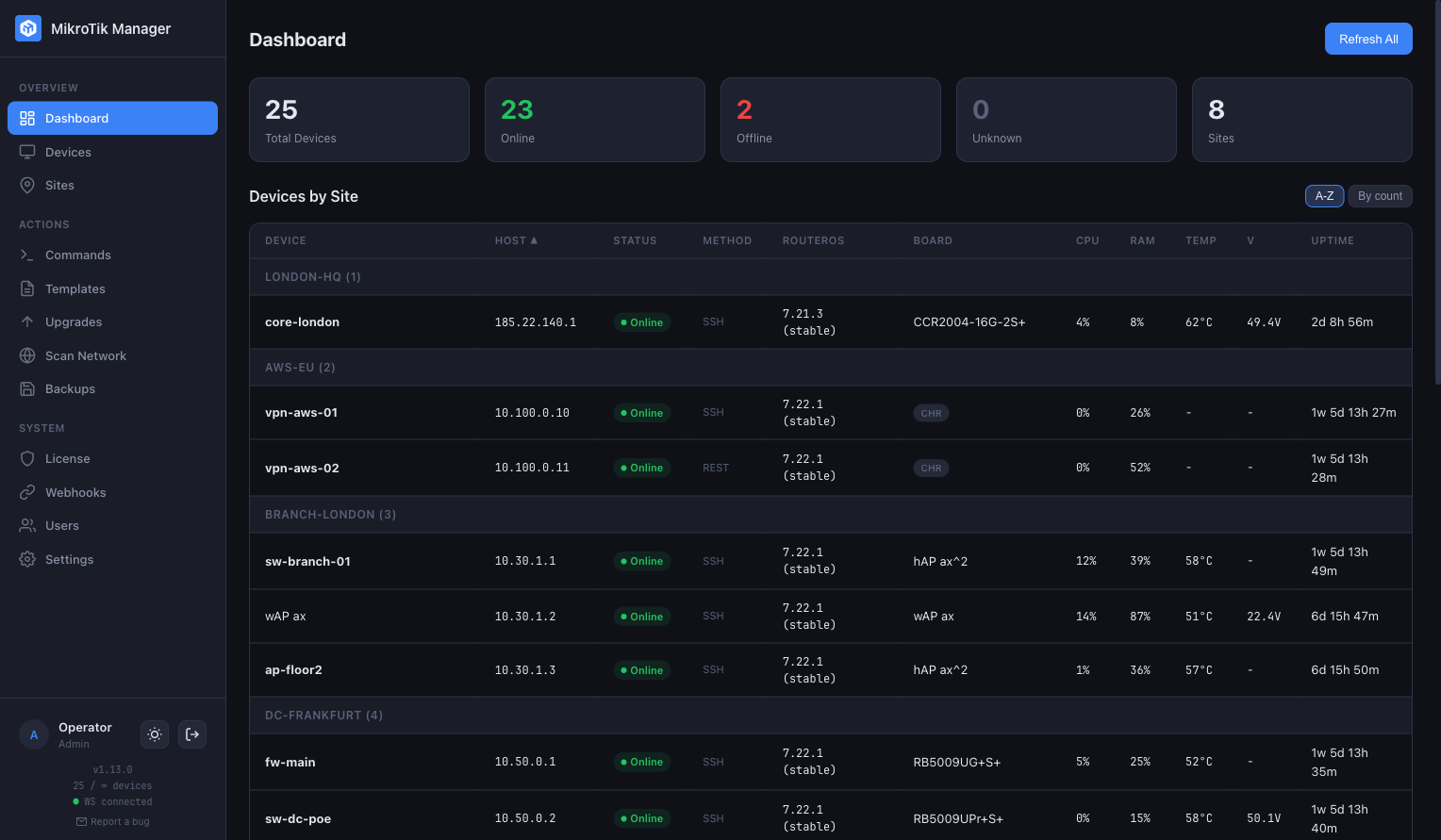
MikroTik Manager — Dashboard with devices grouped by site, showing status, RouterOS version, CPU, RAM, temperature and uptime

Stop doing these things by hand

Built for real operational scenarios, not feature checklists.

Update dozens of devices in minutes

Upgrade RouterOS on 10, 30 or 50 devices with a few clicks — without logging into each one.

  • One-click update check for all devices
  • Saved queue presets with PoE-aware ordering
  • Channel detection (stable/testing/long-term)
  • Post-upgrade version verification

Run changes across all locations at once

Execute CLI commands on selected devices or entire sites simultaneously.

  • Select devices by site or individually
  • Multi-line script templates with Deploy to /system/script
  • Real-time output streaming per device
  • Full command history with audit trail

Always know what changed and when

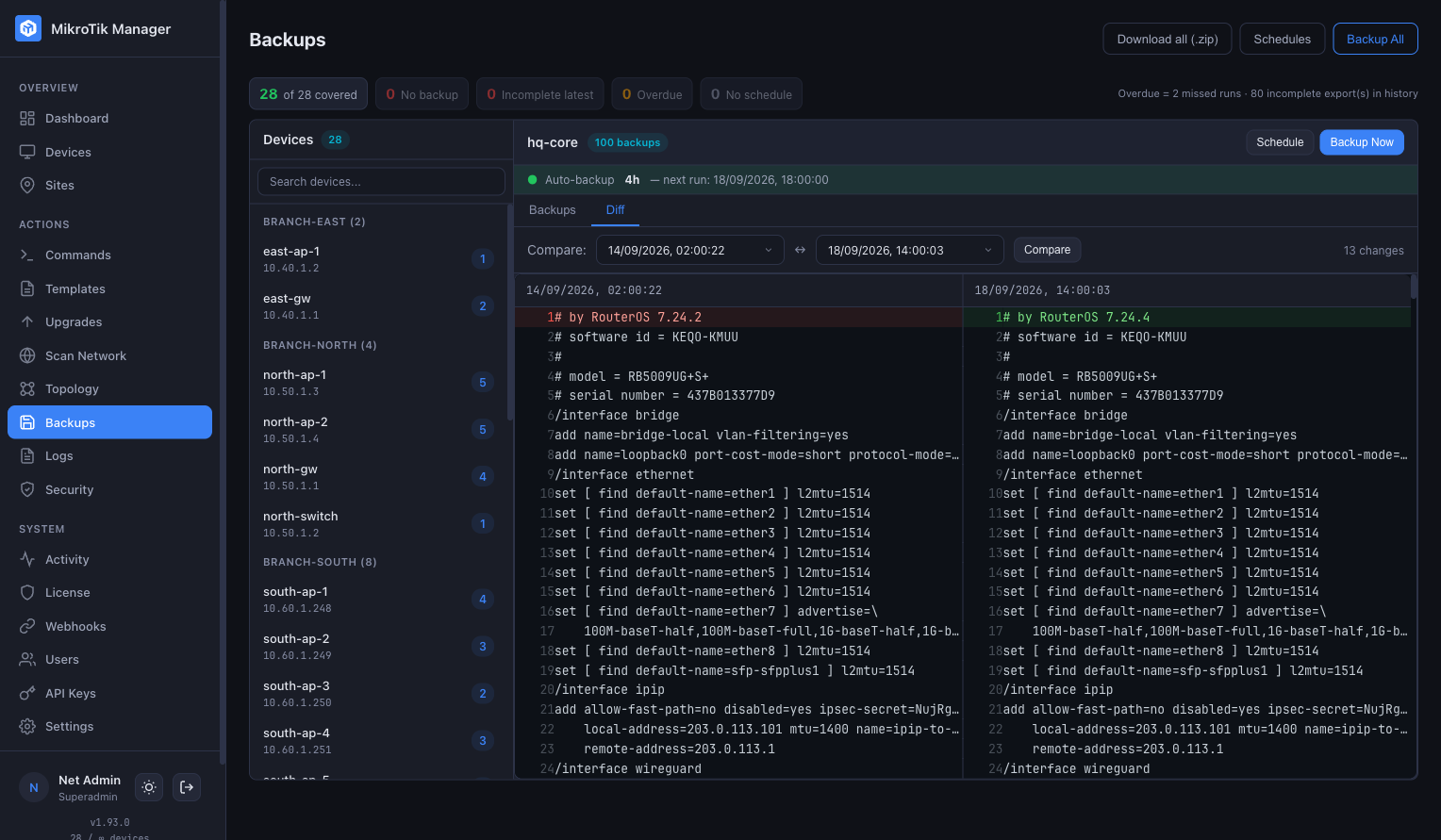
Scheduled config backups with retention policy and accurate diff — review changes without Git or manual exports.

  • Retention policy per schedule (N latest or N days)
  • Side-by-side diff that ignores RouterOS export timestamps
  • Bulk config export across devices
  • Backup history per device

See the real state of your network

Device status, interfaces, PoE, uptime and resources — exactly what you need daily.

  • CPU, RAM, temperature, voltage monitoring
  • Full routing table view (IPv4/IPv6, BGP-aware)
  • Live RX/TX graphs per interface
  • Prometheus /metrics + ready-made Grafana dashboard

Manage devices the way you think

Group devices by sites and locations, not by IP addresses or scripts.

  • Create sites with name & location
  • Topology map per site with auto-discovery
  • Neighbor discovery (MNDP/LLDP/CDP)
  • VLAN/bridge/bond resolved to physical ports

Hardened for production access

2FA, audit trail, encrypted credentials — fit for regulated environments and shared admin teams.

  • 2FA per user: authenticator app (TOTP) or passkey (Touch ID / Face ID / Windows Hello / YubiKey)
  • AES-256 encrypted device credentials
  • Password change invalidates all sessions
  • Full audit trail of commands and changes

Central management for your MikroTik fleet

One console for every RouterOS device you operate.

MikroTik Manager is self-hosted management software built specifically for MikroTik — a lightweight NMS for RouterOS. Instead of logging into routers one by one, you get central, dashboard-driven control of the whole fleet: firmware, configuration, monitoring and access, from a single Docker container on your own server.

You get the convenience of a cloud-style management console — bulk RouterOS upgrades, scheduled config backups with diff, mass CLI and live health monitoring — without sending anything to a cloud. Devices, credentials and data stay entirely on your infrastructure, and it stays light enough to run a 25-device site in about 130 MB of RAM.

Up and running in 5 minutes

One Docker container. No external databases, no message brokers.

1

Deploy

Pull the Docker image and start the container. Works on amd64, arm64.

2

Add devices

Scan your network or add devices manually. SSH, REST API, or SNMP — your choice.

3

Manage

Upgrade firmware, push CLI commands, schedule backups, monitor status — all from one dashboard.

Built for reliability

Modern tech stack designed for MikroTik-specific workflows.

Docker

Single container, 5-minute setup. Multi-arch: amd64, arm64.

Secure by Default

AES-256 encrypted passwords. JWT auth. Helmet + CORS.

SSH + REST API

Native MikroTik protocols. Connection pooling. Self-signed certs.

Real-time WebSocket

Live monitoring, command output, upgrade progress.

SQLite Database

Zero-config, WAL mode. No external DB required.

Prometheus & Grafana

Built-in /metrics endpoint. Ready-made Grafana dashboard included.

RouterOS 7 Native

Built for RouterOS 7 REST API and SSH. No workarounds.

No External Services

No Redis, no Postgres, no message broker. Just Docker.

Buy once. Use forever.

Perpetual license. All features included. No subscriptions. One year of updates included.

Community
€0
forever
 
Up to 10 devices
  • Full functionality
  • No time limits
  • No feature restrictions
  • Self-hosted, your data
Download Free
License 30
€99
one-time payment
+ €39/year for updates (optional)
Up to 30 devices
  • Full functionality
  • Perpetual license
  • 1 year of updates included
  • Renew updates only if you want
Get License 30
Unlimited
€399
one-time payment
+ €99/year for updates (optional)
Unlimited devices
  • Full functionality
  • Perpetual license
  • 1 year of updates included
  • Renew updates only if you want
Get Unlimited License

No subscriptions. No feature gating. No enterprise-only limitations. Self-hosted, full data ownership.

Renewing updates is optional. Your current version keeps working forever without restrictions.

Frequently asked questions

Licensing & upgrades

Licenses are perpetual — they never expire. The optional updates subscription gives you access to new versions. Without it, your current version keeps working forever.

Yes. You pay only the difference between tiers — License 30 → 50 is +€50, 50 → Unlimited is +€250, 30 → Unlimited is +€300. No penalty for starting small.

Your update subscription carries over — the remaining time is preserved and renewed for 12 months from the upgrade date.

One license = one running instance (one container).

Yes. The key is tied to your license, not the host — you received it by e-mail, so just re-enter it on the new server and you’re back.

Self-hosted & offline

Yes. MikroTik Manager runs entirely on your server as a Docker container. Your device credentials and data never leave your infrastructure. No cloud dependency, no phone-home.

No — fleet management runs entirely on your local network, and your license is validated locally with no phone-home. The only outbound traffic is a few optional, read-only public-feed checks (RouterOS CVE feed, latest RouterOS version, Manager update check) — they never carry any of your data, each can be disabled, and they degrade gracefully when offline.

Yes. Core management runs fully in air-gapped environments — the optional public-feed checks simply stay idle with no errors.

Back up the Docker volume (the local SQLite database) and the data/.secrets.json file — losing the latter makes encrypted device passwords unrecoverable. Restore both on the new host and you’re back.

Security
  • Device passwords are encrypted at rest with AES-256-GCM (unique IV per value) and decrypted only in memory at the moment of device communication.
  • Full audit log — command history with user attribution and timestamps.
  • Two-factor authentication — TOTP via any authenticator app, plus optional Passkey / WebAuthn (Touch ID, Face ID, Windows Hello, YubiKey).
Billing

Enter your company name, address and VAT/NIP at checkout and an invoice is issued automatically:

  • EU business with a VAT-UE number — reverse charge, issued without VAT.
  • Polish company with a NIP — 23% Polish VAT.
  • Outside the EU (US, TH, UA …) — no Polish VAT, as an export of services.

Yes — get in touch and we’ll set it up: ihor@hreskiv.pl.

Technical

It’s incredibly light — a live instance managing 25 devices runs in about 130 MB of RAM. It ships as a Docker container (arm64 and x86_64), so it runs on any modern Linux host — or directly on an arm64 MikroTik device with container support.

Any MikroTik device running RouterOS 7.x with SSH or REST API enabled. This includes all RouterBOARD, CCR, CRS, hAP, cAP, and other series.