v1.94.0 · self-hosted · RouterOS 7

Stop logging into MikroTik routers one by one

Central management for the whole fleet. Upgrade RouterOS in bulk, keep dated config backups with a real diff, push one command to every site, and watch CPU, RAM, temperature and PoE live. One container on your own server.

Free for 10 devices · no account · no phone-home

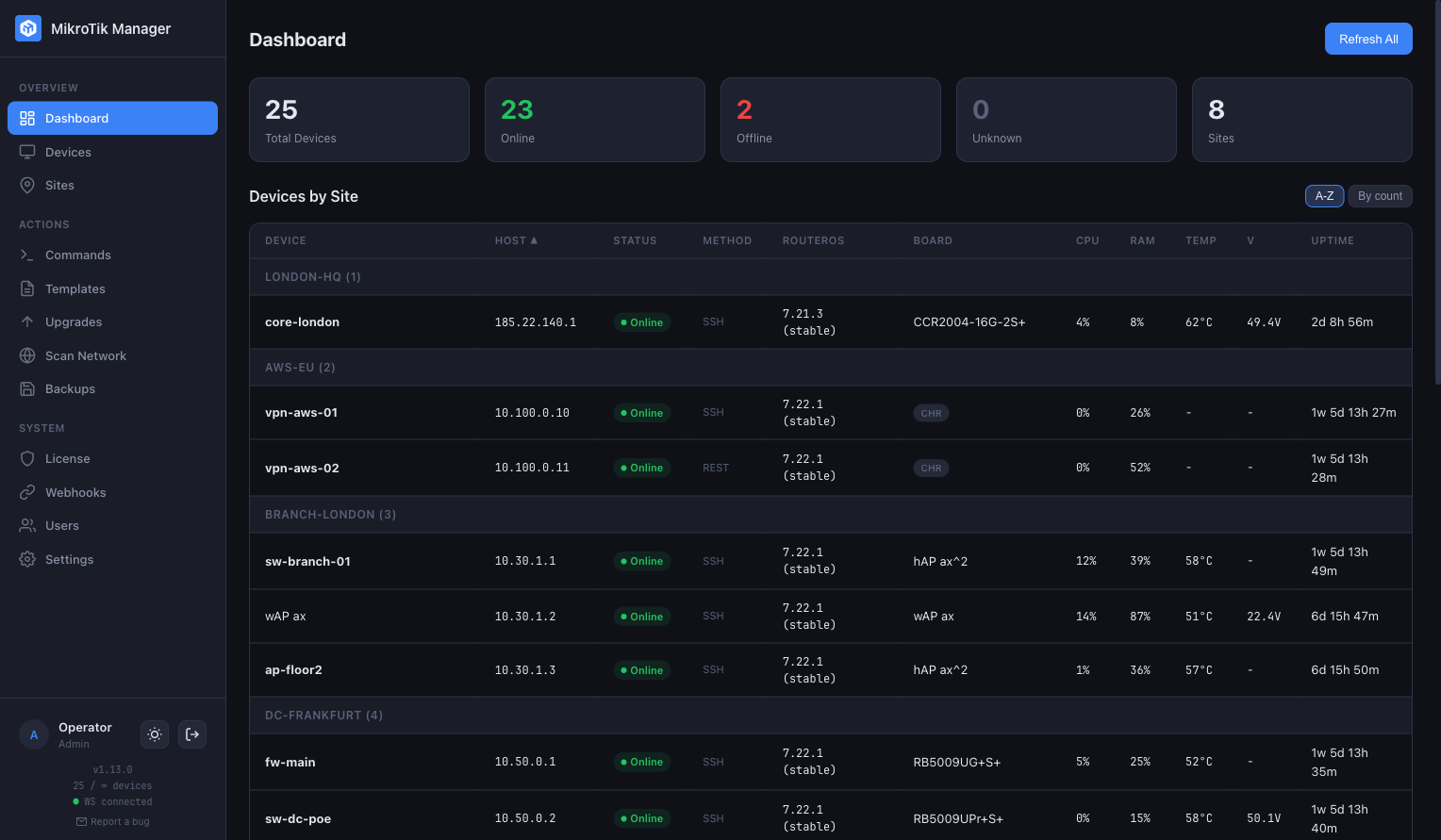
MikroTik Manager dashboard: 28 devices grouped by site, each row showing status, connection method, RouterOS version, board, CPU, RAM, temperature, voltage and uptime.
28 devices, 8 sites, one table. Status, RouterOS version, board, CPU, RAM, temperature, voltage, uptime.
101 stars on GitHub
~130 MB RAM for 25 devices
6 continents with customers
7.x RouterOS over SSH, REST or SNMP
Listed in Made for MikroTik

Six jobs you stop doing by hand

Every one of them is in the product today, not a roadmap item.

Upgrade the fleet, not one device at a time

Check every device for updates in one pass, then run the upgrade as a queue. Each device is verified against the version it should be on after it comes back.

  • Per-device channel — stable, long-term, testing or development, detected, not guessed.
  • RouterOS and firmware separately, in the order that keeps PoE-fed devices alive.
  • Saved queues for the sequence you always run, and a schedule if you want it overnight.
Upgrades page: devices grouped by site with current and latest RouterOS, current and target firmware, and a status of Available, Up to date, FW pending or Offline.
Current against latest, per device. Channels on the right, statuses on the left.

Know what changed, and when

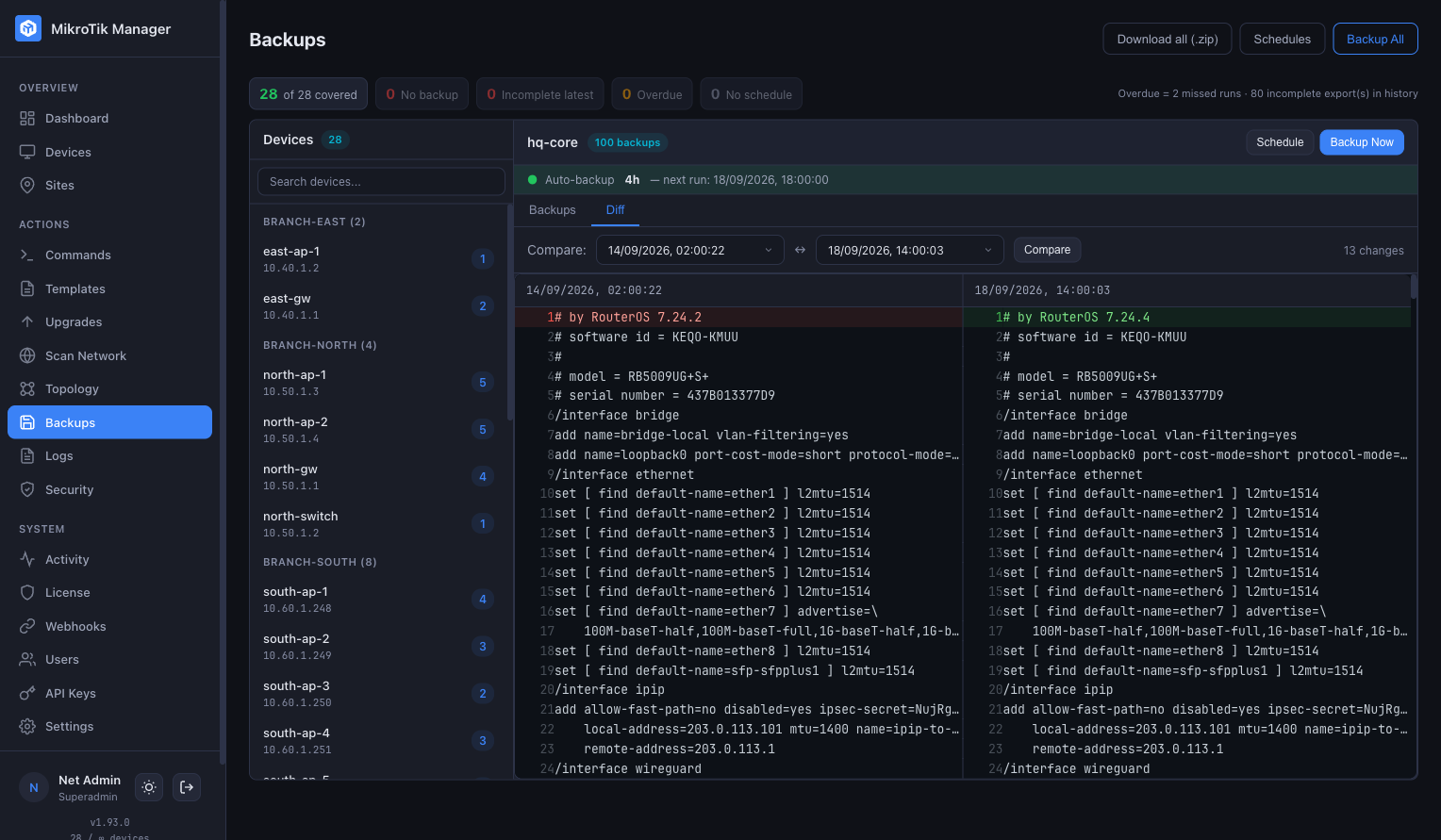
Backups run on a schedule you set per device, with a retention policy so the list never becomes a junk drawer. Two of them side by side give you the answer without Git and without manual exports.

  • A real diff that ignores the export timestamp, so only genuine changes are highlighted.
  • Retention per schedule — keep the last N, or the last N days.
  • Export the lot for a whole site in one archive.
Backups page: a device list on the left with backup counts, and two dated configuration exports compared side by side with 13 changes highlighted.
Two exports of one device, compared. 13 changes, timestamp line ignored.

One page holds everything about a device

Open a device and the state is already there: load, heat, power, the port map with link speeds and PoE draw, what it can see, and where its traffic goes. No tabs to hunt through, no second tool.

  • Ports as they are — link speed per port, PoE watts, bridges, VLANs and bonds resolved to physical ports.
  • Neighbours and routes, IPv4 and IPv6, with the tunnels the device actually has.
  • Exposed services flagged so an open Telnet or FTP does not stay unnoticed.
Device page for a 17-port PoE switch: CPU load, RAM, temperature, voltage and uptime; host, board, architecture, serial, connection method and RouterOS version; exposed services; a PoE budget bar; a port map with PoE and link speeds; bridges and VLANs.
CPU, RAM, 57 °C, 54.3 V, uptime. Exposed services flagged, 22.3 W of a 600 W PoE budget, every port with its link speed and draw.

Read the whole fleet's log in one window

Every device sends its log to the manager, and you read all of them in one stream instead of opening a terminal on each one. It keeps running while you look at something else, so the evidence is already there when you need it.

  • Live tail you can pause, or any window of history you pick.
  • Filter by site, device, topic, severity or message text.
  • Export exactly what you are looking at, as CSV or plain text.
Logs page: filters for site, device, time range and severity above a live stream of syslog lines, each with timestamp, device, topics and message, and an export button.
One stream for the fleet. Filters across the top, live tail below, export on the right.

Run one command everywhere

Pick devices, or pick a site, and send the same command to all of them. Output streams back per device as it arrives, and every run is kept with who ran it.

  • Multi-line templates, saved and reusable.
  • A full history with author and timestamp.

Group by site, not by IP

Devices belong to sites the way your network really is laid out. Scan a subnet to find what is there, and let discovery draw how it is connected.

  • Neighbour discovery over MNDP, LLDP and CDP.
  • A topology map per site, from what the devices report.

Where it fits, and what it needs

It does not replace the tools you already trust. It sits where none of them do.

Alongside
Winbox, WebFig One device at a time, in depth. Same devices, one console: select fifty, act once, see the result per device.
The Dude Discovery and a map of the network. Adds bulk upgrades, scheduled backups with diff, user roles and an audit trail.
Zabbix, Prometheus, Grafana Metrics, history and alerting. Feeds them. Exports its own metrics, and ships a Grafana dashboard and a Zabbix template.
A cloud management portal Central control, off your network. The same convenience on your own server. Credentials never leave it.
Requirements
Host Any modern Linux with Docker. amd64 or arm64, including an arm64 MikroTik with container support.
Footprint About 130 MB of RAM for 25 devices. No external database, no cache server, no message broker.
Devices RouterOS 7.x. Reachable over SSH or the REST API, or SNMP where you only want to read.
Network Runs fully offline. A handful of optional read-only public feeds are the only outbound traffic, and each can be switched off.
Access Roles per user, two-factor sign-in. An authenticator code or a passkey, device passwords encrypted at rest, everything written to an audit log. Read how it is secured
Licence Bought once, yours for good. Free for 10 devices. Updates are a separate year, and optional.

Running in five minutes

One image. Nothing else to install first.

01

Pull and start

One container, one port. Works on amd64 and arm64.

02

Add devices

Scan a subnet, or add them by hand. SSH, REST or SNMP, per device.

03

Work the fleet

Upgrade, back up, push commands, watch the state. From one screen.

# pull the image and start it
docker pull ghcr.io/hreskiv/mikr:latest
docker compose up -d

Full walkthrough, including the compose file and the first login: installation docs

Buy once. Use forever.

A perpetual licence, every feature included, one year of updates in the price.

 
Community
€0
forever
 
Up to 10 devices
  • Every feature
  • No time limit
  • No feature gates
  • Self-hosted, your data
Download
 
License 30
€99
one-time payment
+ €39/year for updates (optional)
Up to 30 devices
  • Every feature
  • Perpetual licence
  • 1 year of updates included
  • Renew updates only if you want
Get License 30
 
Unlimited
€399
one-time payment
+ €99/year for updates (optional)
Unlimited devices
  • Every feature
  • Perpetual licence
  • 1 year of updates included
  • Renew updates only if you want
Get Unlimited

No subscription. No feature gating, no enterprise-only limits. Self-hosted, and the data is yours.

Renewing updates is optional. The version you have keeps working, without restrictions.

Buy from anywhere. Invoiced from Poland in EUR or PLN: EU businesses with a VAT-UE number under reverse charge, Polish companies with 23% Polish VAT, and everyone outside the EU as an export of services.

Already a customer? Upgrade or renew your licence

Questions people actually ask

Anything missing, write to support@mikr.app.

Licensing & upgrades

Licenses are perpetual — they never expire. The optional updates subscription gives you access to new versions. Without it, your current version keeps working forever. Renew your updates →

Yes. You pay only the difference between tiers — License 30 → 50 is +€50, 50 → Unlimited is +€250, 30 → Unlimited is +€300. No penalty for starting small. Upgrade your license →

Your update subscription carries over — the remaining time is preserved and renewed for 12 months from the upgrade date.

One license = one running instance (one container).

Yes. The key is tied to your license, not the host — you received it by e-mail, so just re-enter it on the new server and you’re back.

Self-hosted & offline

Yes. MikroTik Manager runs entirely on your server as a Docker container. Your device credentials and data never leave your infrastructure. No cloud dependency, no phone-home.

No — fleet management runs entirely on your local network, and your license is validated locally with no phone-home. The only outbound traffic is a few optional, read-only public-feed checks (RouterOS CVE feed, latest RouterOS version, Manager update check) — they never carry any of your data, each can be disabled, and they degrade gracefully when offline.

Yes. Core management runs fully in air-gapped environments — the optional public-feed checks simply stay idle with no errors.

Back up the Docker volume that holds the database, and the secrets file next to it — losing the latter makes encrypted device passwords unrecoverable. Restore both on the new host and you’re back.

Security
  • Device passwords are encrypted at rest with AES-256-GCM (unique IV per value) and decrypted only in memory at the moment of device communication.
  • Full audit log — command history with user attribution and timestamps.
  • Two-factor authentication — TOTP via any authenticator app, plus optional Passkey / WebAuthn (Touch ID, Face ID, Windows Hello, YubiKey).
Billing

Enter your company name, address and VAT/NIP at checkout and an invoice is issued automatically:

  • EU business with a VAT-UE number — reverse charge, issued without VAT.
  • Polish company with a NIP — 23% Polish VAT.
  • Outside the EU (US, TH, UA …) — no Polish VAT, as an export of services.

Yes — get in touch and we’ll set it up: billing@mikr.app.

Technical

It’s incredibly light — a live instance managing 25 devices runs in about 130 MB of RAM. It ships as a Docker container (arm64 and x86_64), so it runs on any modern Linux host — or directly on an arm64 MikroTik device with container support.

Any MikroTik device running RouterOS 7.x with SSH or REST API enabled. This includes all RouterBOARD, CCR, CRS, hAP, cAP, and other series.

Ten devices, free, for as long as you like

No account, no trial clock. If the fleet outgrows it, the licence is a one-time payment.

Get started